MCP Server
The FLEXIDESK Model Context Protocol (MCP) server allows you to manage your FLEXIDESK workspace directly from compatible AI tools, such as Cursor, ChatGPT or Claude Code.
You can:
- view your office schedule
- view your personal schedule
- book desks
- cancel desk bookings
with natural language!
What is MCP?
Model Context Protocol (MCP) is a way for AI tools to connect to external tools and services. It lets AI apps understand and interact with things outside themselves using natural language commands. When you ask the AI to do something, the MCP server handles the request by talking to the right service, then returns the results in a standard format that the AI can use. Essentially, it acts as a bridge between AI and the real-world systems it needs to work with.
Learn more at https://modelcontextprotocol.io.
How it works
You can connect to the FLEXIDESK MCP Server via:
https://app.flexidesk.ai/mcp
Once you have configured your AI tool, it will communicate with FLEXIDESK via this connection.
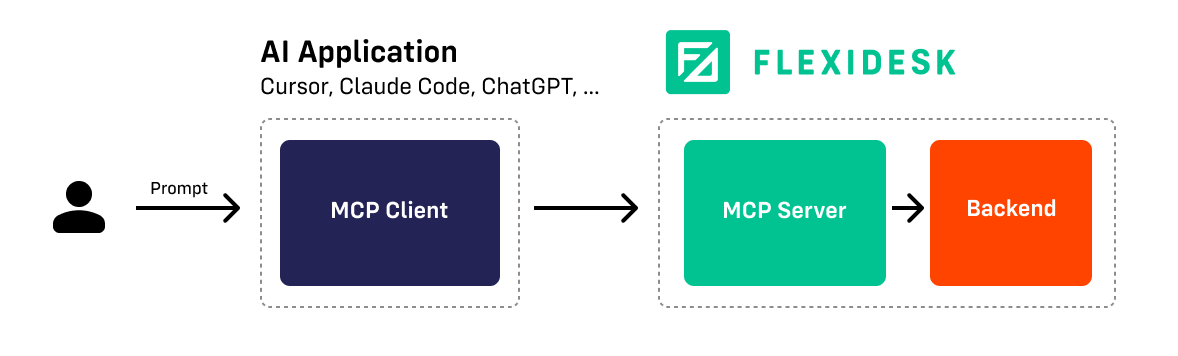
Communication is handled via Streamable HTTP. Server-Sent Events (SSE) are not supported as this method is deprecated. Make sure your AI tool supports Streamable HTTP. You may need to update it to the latest version.
Setup
1. Create API Key
Authentication is required for each MCP request. Create an API key via https://HOST_REPLACE/personal-settings/api-keys.
2. Configure your AI tool
Set up your AI tool.
- Cursor
- Other tools
Add the following configuration to ~/.cursor/mcp.json:
{
  "mcpServers": {
    "FLEXIDESK": {
      "url": "https://app.flexidesk.ai/mcp",
      "headers": {
        "X-API-KEY": "<YOUR_API_KEY>"
      }
    }
  }
}
For more details, see the Cursor MCP documentation.
The AI tool needs to support configuring a custom MCP server and be able to call tools. For an exhaustive list of clients, see https://modelcontextprotocol.io/clients.
3. Use it
You can now book your desk via the AI tool. Here are some example prompts:
- Book a desk for today next to my co-worker John Doe.
- I am coming in late to work. Set my desk booking to start at 1 pm.
- Cancel my desk bookings for Friday.
- ...
A. Via OAuth
If your AI tool supports OAuth, you can connect to the FLEXIDESK MCP server via this method as an alternative to using an API key. Simply follow the instructions provided by the AI tool you are using.